You wrote a great prompt three weeks ago. It got you exactly the ChatGPT output you needed. Now you need it again, and it's buried somewhere in a chat history you can't search. That's the exact problem Dropprompt is built to solve — and it throws in a marketplace where you can buy other people's best prompts, or sell your own.
Here's what it actually does, how the free version works, and where it falls short.
What Is Dropprompt, Exactly?
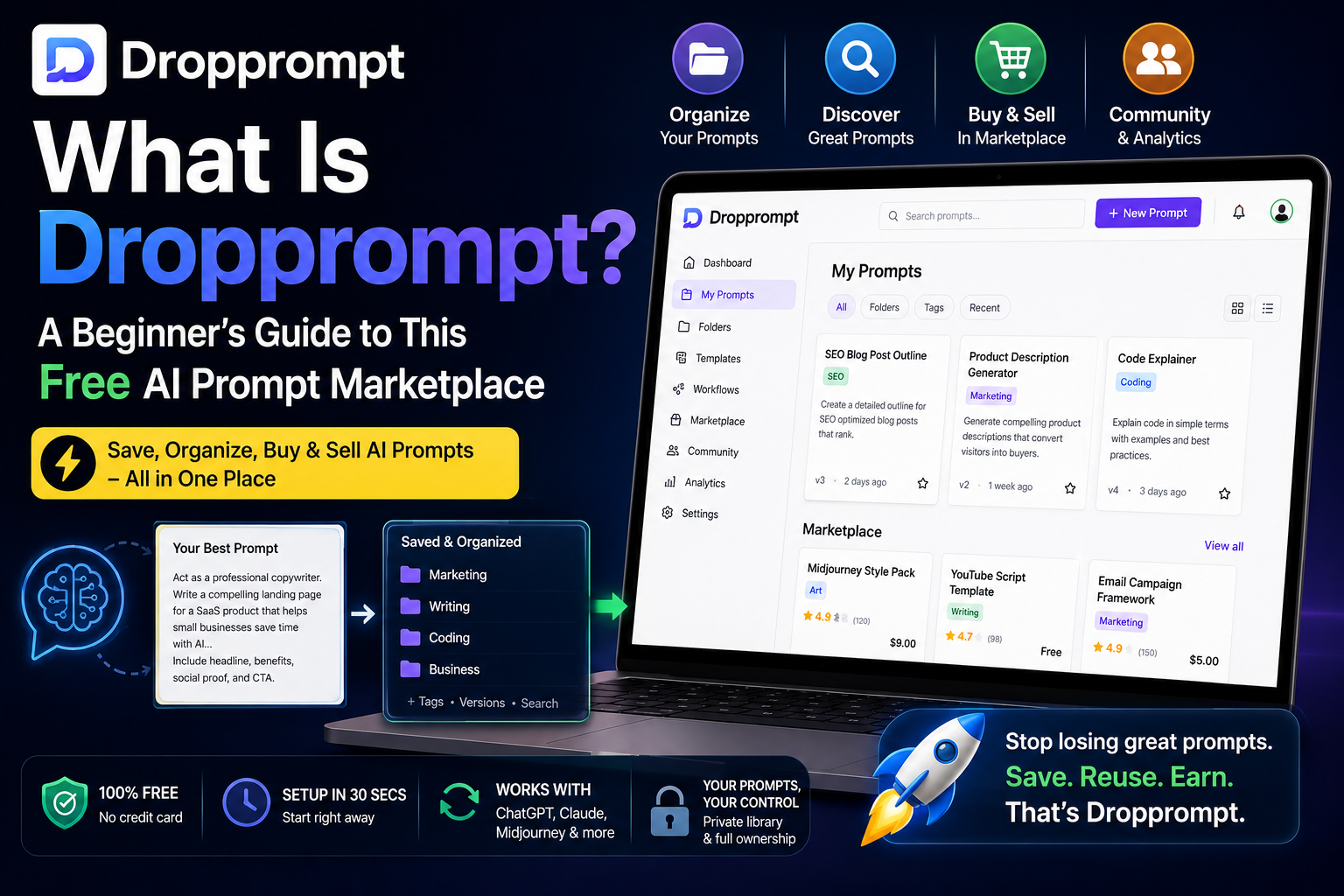
Dropprompt is a workspace for saving, organizing, and reusing AI prompts, paired with a marketplace where people buy and sell prompts instead of writing them from scratch. Instead of your best ChatGPT or Midjourney prompts living in scattered chat logs and random notes app entries, you keep them in one searchable library with folders, tags, and version history.
It's free to start, doesn't ask for a credit card, and the site claims setup takes about 30 seconds. It's built to work across tools rather than locking you into one AI model — the site specifically calls out ChatGPT, Claude, and Midjourney as supported.
One quick note to avoid confusion: there's a similarly named tool, droPrompt (spelled as one word), that's a completely different product — a prompt generator and workflow builder. This article is specifically about Dropprompt.com, the workspace-and-marketplace tool.
What Can You Actually Do With It?
Dropprompt splits into two halves: a private workspace for your own prompts, and a public marketplace for everyone else's.
- Prompt Library: Save prompts into folders, tag them, search them, and pull up full version history so you can see how a prompt evolved.
- Prompt Editor: Write, preview, and test prompts, including ones with variables and templates you can reuse with different inputs instead of rewriting from zero every time.
- Workflows: Chain multiple prompts together into a repeatable, step-by-step process — useful if you regularly run the same multi-step task through an AI tool.
- Marketplace: Browse prompts other people have published, filtered by category, price, and type (single prompts or PDF prompt packs).
- Community: A discussion space for creators to share what's working and troubleshoot prompts together.
- Analytics: If you publish prompts, you can track views, uses, and sales.
How Do You Actually Get Started?
- Browse first, no account needed. Head to the marketplace and filter by category to see if there's anything useful for your specific work — copywriting, coding, social media, whatever you need.
- Sign up when you want to save something. Registration takes about 30 seconds and doesn't ask for a credit card.
- Build your own library. Paste in prompts you already use and rely on, tag them by project or use case, and let the version history track your edits going forward.
- Turn repeat prompts into templates, and publish the good ones. If you reuse the same structure with different details each time, build it as a template with variable placeholders instead of retyping it — and once you trust a prompt, list it on the marketplace, priced or free, and track how it performs.
One thing worth flagging: like any third-party workspace, you're trusting Dropprompt with whatever you store there. Keep client-confidential or personal details out of saved and published prompts — stick to structure and wording instead.
How Big Is the Marketplace, Really?
As of this writing, Dropprompt's marketplace lists 212+ prompts across 26 categories, with over 2,900 recorded uses and roughly 1,100 active users. That's a small marketplace compared to giants like PromptBase, but it's genuinely usable — you can filter by category (Writing, Coding, Marketing, Art, Business, SEO & Blogging, and 20 more), by price (free or paid), and by type.
A meaningful chunk of what's listed is free. Browsing doesn't require an account at all — you only need to sign up if you want to save prompts to your own library or publish your own.
Dropprompt vs. Just Keeping Prompts in a Doc: Which Should You Use?
| Approach | Best for | Where it falls short |
|---|---|---|
| Dropprompt | Organizing prompts with tags/versions, discovering ready-made prompts, selling your own | Smaller library than dedicated marketplaces like PromptBase; you're trusting a third-party site with your prompt library |
| Google Docs or Notion | Full control, no new account, works alongside everything else you already store there | No built-in versioning for individual prompts, no marketplace, no variables/templates system |
| ChatGPT's own saved prompts/custom instructions | Zero setup, lives right where you're already working | Locked to one tool, no tagging or search across a large library, nothing to sell |
If you're a solo user who only occasionally reuses a prompt, a Notion page works fine. If you're managing dozens of prompts across multiple AI tools, or you want to test whether your prompts have resale value, Dropprompt's structure earns its keep.
Can You Actually Make Money Selling Prompts on Dropprompt?
You can list prompts for sale, and the site states there's no fee on your first $100 in sales — a decent incentive to test the water. But set realistic expectations: with roughly 1,100 active users and free prompt lists all over Reddit and YouTube, a single prompt isn't going to replace your day job.
Where this could genuinely work for you: if you've already built a repeatable, tested prompt system for a specific niche — say, a prompt pack for real estate listing descriptions, or a workflow for turning a rough voice memo into a polished LinkedIn post — bundling that as a PDF pack and listing it costs you nothing but time.
The Mistake Beginners Make With Prompt Marketplaces
Don't buy or copy a marketplace prompt expecting it to work identically for your use case. Prompts are context-dependent — one tuned for a specific AI model's settings can behave differently on another, and a prompt built for one industry rarely transfers cleanly without editing. Treat every marketplace prompt as a starting template, not a finished tool. Test it, tweak the wording for your situation, then trust the output.
Frequently Asked Questions
Is Dropprompt free to use?
Yes. Browsing the marketplace requires no account, and creating a workspace to save and organize your own prompts is free with no credit card required.
Does Dropprompt work with ChatGPT and Claude?
Yes. Dropprompt is built to be tool-agnostic — prompts you save or buy can be used with ChatGPT, Claude, Midjourney, or any other AI tool you paste them into.
Is Dropprompt the same as droPrompt?
No. Dropprompt.com is a prompt workspace and marketplace for organizing, buying, and selling prompts. droPrompt (one word) is a separate, unrelated tool that generates and enhances prompts and builds AI workflows. The similar names are a common source of confusion.
How much can I earn selling prompts on Dropprompt?
There's no guaranteed income. The platform waives fees on your first $100 in sales, but with a relatively small user base, earnings depend heavily on how unique and tested your prompt or prompt pack is.
Do I need to know how to code to use Dropprompt?
No. It's built for anyone who uses AI tools regularly, including writers, marketers, and small business owners, not just developers.
What's the biggest reason to use Dropprompt over just saving prompts in a notes app?
Version history and tagging. If you tend to rewrite the same prompt repeatedly because you can't find the last good version, a structured library solves that specific problem in a way a plain notes app doesn't.
Should You Try Dropprompt?
If you've ever lost a good prompt in your chat history, Dropprompt's free workspace is worth ten minutes of your time to set up. Just don't go in expecting the marketplace to be a shortcut to passive income — treat it as a discovery tool first, and a side income experiment second, if at all.