If you've spent an afternoon with ten browser tabs open trying to figure out which automation tool actually fits your business, you're not alone. n8n, Make, and Zapier all promise to connect your apps and now, thanks to a wave of 2026 updates, all three promise "AI agents" too. The catch is that they're built for different people, and picking the wrong one means paying more than you need to, or hitting a wall the moment your workflow gets complicated.
Here's how the three actually compare right now, and which one fits you.
What's the Real Difference Between n8n, Make, and Zapier?
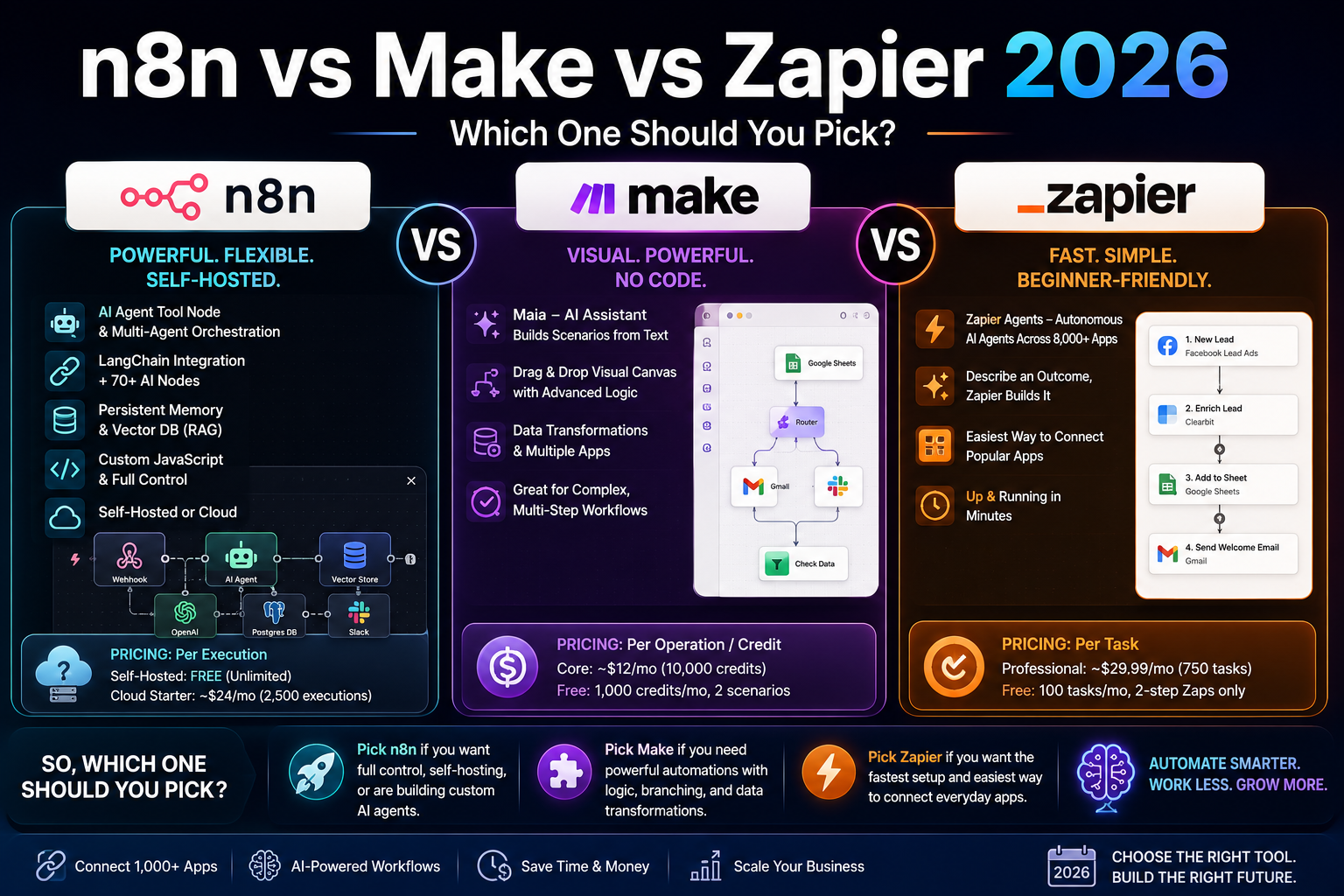
Zapier is built for speed: pick a trigger, pick an action, done. It's the easiest of the three if you've never automated anything before. Make sits in the middle — a visual, drag-and-drop canvas that lets you branch logic and handle multiple steps without writing code, but with more of a learning curve than Zapier. n8n is the developer-leaning option: it's self-hostable, supports custom JavaScript inside workflows, and gives you the most control over exactly how your automation behaves — at the cost of a steeper setup.
None of that has changed in 2026. What has changed is how each platform handles AI.
How Are n8n, Make, and Zapier Handling AI Agents in 2026?
All three companies spent the last year racing to bolt "agent" capabilities onto their platforms, and the approaches are genuinely different, not just marketing labels.
n8n shipped n8n 2.0 in January 2026 with an AI Agent Tool Node built for multi-agent orchestration, native LangChain integration across more than 70 AI-specific nodes, persistent agent memory that survives between workflow runs, vector database support for RAG (retrieval-augmented generation) setups, and sandboxed code execution. If you want to build a custom AI agent that remembers context and calls other tools, n8n currently gives you the most raw capability of the three.
Make introduced Maia, an AI assistant that builds entire scenarios from a plain-English description instead of making you drag every module by hand. It's aimed at people who understand what they want automated but don't want to learn Make's canvas from scratch.
Zapier launched Zapier Agents, which run autonomous multi-step tasks across its catalog of more than 8,000 connected apps without a human clicking "run" each time. It's the most beginner-friendly of the three AI features, because you're describing an outcome rather than configuring a workflow.
If you're a non-technical small business owner, Zapier Agents or Make's Maia will get you further, faster. If you're comfortable with a bit of technical setup and want a custom AI agent wired into your own tools, n8n is the stronger foundation.
n8n vs Make vs Zapier: Pricing Compared
This is where most people get surprised, because the three platforms don't just charge different amounts — they charge for different things entirely.
| Platform | What You're Billed For | Entry Paid Plan | Free Tier |
|---|---|---|---|
| Zapier | Per task (every single action in a Zap) | Professional, from around $29.99/mo (750 tasks) | 100 tasks/mo, 2-step Zaps only |
| Make | Per operation/credit (each module call) | Core, roughly $12/mo (10,000 credits) | 1,000 credits/mo, 2 active scenarios |
| n8n | Per execution (an entire workflow run = 1 unit) on Cloud, or free if self-hosted | Cloud Starter, roughly $24/mo (2,500 executions) | Self-hosted Community Edition: free, unlimited executions |
That "billed per execution" detail matters more than it looks. Picture a 10-step workflow that runs 10,000 times a month. On Zapier, that's potentially 100,000 billable tasks. On n8n, it's 10,000 executions — one per full run, regardless of how many steps are inside it. That's why agencies running high-volume workflows increasingly move to n8n once they outgrow Zapier's free or entry tier, even if it means a bit more setup work up front.
n8n's self-hosted Community Edition is also the only genuinely free-forever option among the three, provided you're willing to run it on your own server (a small VPS typically costs $3–$7/month). That's a meaningful difference if you're watching every rupee or dollar of overhead.
Pricing on all three platforms changes often, so treat these numbers as a snapshot and double-check the official pricing pages before you commit.
Which One Should You Actually Choose?
Match the tool to your situation instead of chasing whichever one your favorite YouTuber uses:
- Pick Zapier if you've never built an automation before, need it working in the next 20 minutes, and mostly connect mainstream apps like Gmail, Slack, and Google Sheets.
- Pick Make if your workflow has branching logic, multiple conditions, or several data transformations, and you're comfortable with a visual canvas but don't want to code.
- Pick n8n if you're technical (or working with someone who is), want to self-host for cost or data-privacy reasons, or you're building a custom AI agent that needs memory and tool-calling.
A common mistake: starting on Zapier for a workflow that's going to scale to thousands of runs a month, then getting a shock bill six months in. If you can already tell your automation is going to run often and involve several steps, it's usually cheaper in the long run to build it on Make or n8n from day one.
Can You Use More Than One of These Tools Together?
Yes, and plenty of businesses do. It's common to use Zapier for quick, low-volume connections between everyday apps, while running the high-volume or AI-agent-driven workflows on n8n. There's no rule that says you have to pick just one platform for your entire business — pick the right tool per workflow, not per company.
Frequently Asked Questions
Is n8n better than Zapier for beginners?
No. Zapier is easier to start with because its interface is simpler and it needs no technical setup. n8n has a steeper learning curve, especially if you self-host it, so it suits people who are comfortable with some technical configuration or willing to learn it.
Which is cheaper, Make or Zapier?
Make is generally cheaper for workflows with multiple steps, because it bills per operation rather than per task, and its entry paid plan costs less than Zapier's. Zapier can still be the better deal for very simple, low-volume, single-step automations thanks to its free tier.
Can I build an AI agent without coding on any of these platforms?
Yes. Zapier Agents and Make's Maia both let you describe what you want in plain English and generate the automation for you, with no code required. n8n's AI Agent Tool Node is also usable without traditional coding, but it assumes more comfort with technical concepts like nodes, memory, and tool connections.
Is n8n really free?
The self-hosted Community Edition is free software with unlimited workflow executions — you only pay for the server it runs on, typically $3–$7/month on a basic VPS. n8n Cloud, the hosted version, is a separate paid product starting at roughly $24/month.
Which tool works best for connecting AI tools like ChatGPT or Claude to my business apps?
All three can connect to AI APIs, but n8n currently offers the deepest native AI tooling (LangChain integration, vector databases, persistent agent memory), which makes it the strongest choice if you're building anything beyond a simple "send this to ChatGPT and post the reply" workflow.
Do I need to know how to code to use any of these tools?
No, all three are no-code/low-code platforms at their core. n8n does let you add custom JavaScript when you want finer control, but it's optional — you can build fully functional workflows in any of the three without writing a line of code.
Bottom Line
There's no single winner here — only the right fit for what you're automating. If you want the fastest start, go with Zapier. If your workflows have real branching logic, Make will save you money as you scale. If you're technical, cost-conscious, or building a genuine AI agent, n8n currently leads the pack. Start with the one that matches your workflow's complexity today, not the one you might need a year from now — you can always switch, or run more than one, as your needs grow.