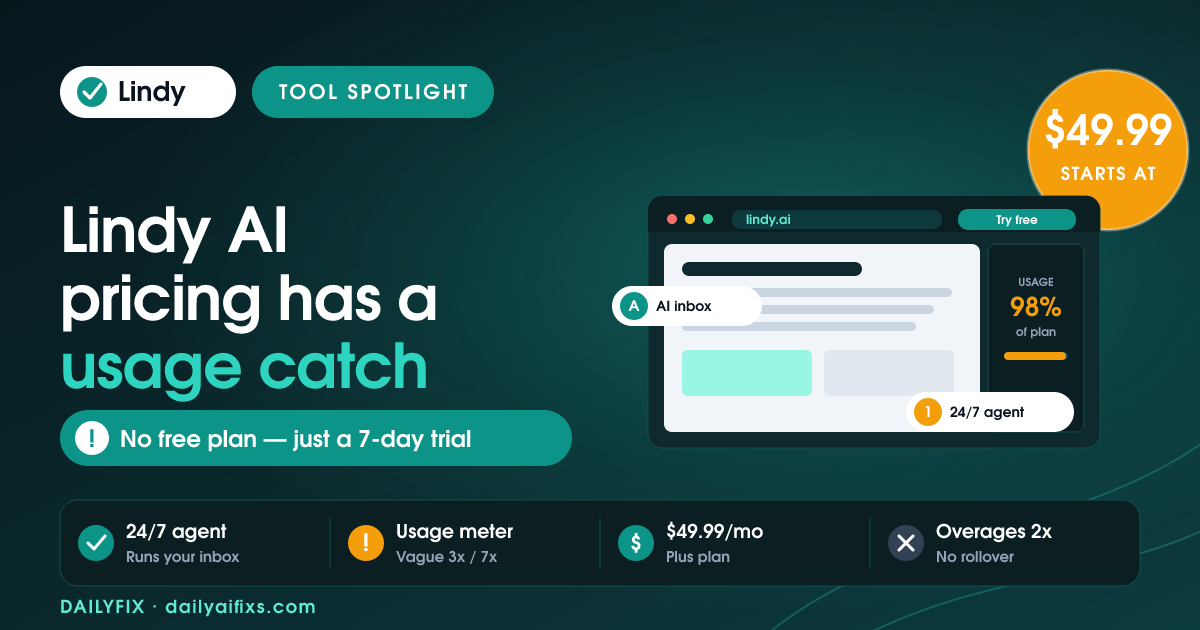
TL;DR: Lindy AI pricing in 2026 runs $49.99/month (Plus), $99.99 (Pro), and $199.99 (Max), with Enterprise on a custom quote. There is no permanent free plan anymore — just a 7-day trial. The catch: tiers are sold as vague "usage" multiples (3x, 7x) instead of clear credit counts, credits don't roll over, and overages bill at double the normal rate.
Last updated: July 2026 · By Sandeep Singh, DailyFix
Lindy is an AI assistant that runs your inbox, calendar, meetings, and follow-ups, and it's one of the more talked-about AI agent tools of 2026. We dug into the official pricing page and recent independent reviews to see what you actually pay — and where the meter bites. As of July 2026, the pricing looks simple on the surface and gets murky once you read how usage is counted.
What are the Lindy AI pricing plans in 2026?
Lindy AI pricing has three paid tiers plus Enterprise. According to Lindy's pricing page (checked July 2026), Plus is $49.99/month, Pro is $99.99/month, and Max is $199.99/month. Enterprise is a custom quote. Each step up mainly buys more "usage" and more connected inboxes rather than new core features.
| Plan | Price / month | Usage | Inboxes | Best for |
|---|---|---|---|---|
| Plus | $49.99 | Standard | Up to 2 | Solo users testing an AI assistant |
| Pro | $99.99 | 3x Plus | Up to 3 | Heavier daily automation, model choice |
| Max | $199.99 | 7x Plus | Up to 5 | Power users running many agents |
| Enterprise | Custom | Shared + bonus credits | Custom | Teams needing SSO, HIPAA, audit logs |
Prices and limits change often — verify on the official pricing page before deciding.
The Pro tier adds "computer use" and lets you pick which AI model Lindy runs on, which matters because heavier models burn usage faster. For context, Lindy frames all of this against a human executive assistant at roughly $8,000/month — a fair comparison for teams, but a stretch for a solopreneur weighing a $49.99 tool.
How do Lindy AI credits and usage limits work?
Lindy AI credits are consumed per task, and the number depends on how heavy the task is. Simple automations cost around 1 credit, while AI-intensive jobs like drafting emails, enriching data, or long reasoning chains can cost 5–10 credits each. The important limits: credits reset monthly and do not roll over, and when you run out, your agents pause until the next billing cycle.
Here's where the "usage meter catch" lives. In early 2026, Lindy moved to the Plus/Pro/Max lineup and stopped publishing exact credit counts for these tiers, describing them only as "3x more usage" or "7x more usage" than Plus. That makes it hard to predict whether $49.99 covers your real workload before you sign up. One automation running 24/7 can replace 10–20 hours of manual work a week — but only if you don't hit a wall mid-month.
Does Lindy AI still have a free plan?
No. Lindy AI no longer offers a permanent free plan in 2026. According to Lindy's pricing page (checked July 2026), the only free entry point is a 7-day trial with full access to Plus features — inbox management, meeting scheduling, note-taking, and 24/7 texting with the assistant. After 7 days you must pick a paid tier to keep your agents running.
This is a real change worth flagging: earlier versions of Lindy advertised a monthly free credit allowance, and older reviews still reference it. If a blog tells you Lindy has a "free plan with 400 credits," that information is out of date as of mid-2026. Budget for at least the $49.99 Plus tier from day one.
What do Lindy AI overage charges cost?
Lindy AI overage charges are billed at double the standard credit rate once you exceed your plan's monthly usage. That means the tasks you run after hitting your limit cost twice as much per credit as the ones inside your plan — a pricing structure that punishes exactly the months when your agents are busiest.
Independent reviews back this up as the biggest pain point. Cloudtalk's 2026 pricing guide notes overages bill at double rate, and billing surprises dominate Lindy's user reviews, where the tool sits at roughly 1.7/5 on Trustpilot as of July 2026 largely because of unexpected charges. The fix is discipline: watch your usage inside the app, keep heavy models for tasks that need them, and set your own monthly ceiling before the meter sets one for you.
Is Lindy AI worth it for solopreneurs?
Lindy AI is worth it for a solopreneur if email, scheduling, and follow-ups eat more than a few hours of your week and you'll actually let an agent handle them. At $49.99/month, Plus pays for itself against even one saved hour a week. It's not worth it if you want predictable, capped billing or you only need occasional automation — the no-rollover credits and double-rate overages make light or spiky usage feel expensive.
If you mainly want workflow automation rather than an inbox assistant, compare Lindy against usage-priced automation platforms before committing, since the credit model is where costs quietly grow.
Frequently asked questions
How much does Lindy AI cost per month?
Lindy AI costs $49.99/month for Plus, $99.99 for Pro, and $199.99 for Max, based on the official pricing page checked in July 2026. Enterprise pricing is custom and requires contacting sales. Annual billing can lower the effective monthly price, but the three published tiers are the starting point for most individual users.
Does Lindy AI have a free trial?
Yes. Lindy AI offers a 7-day free trial with full access to Plus features, including inbox management, meeting scheduling, note-taking, and 24/7 texting with your assistant. You set up in about 60 seconds by connecting a phone number. After the trial ends, you must choose a paid plan to keep your agents active.
Do Lindy AI credits roll over?
No. Lindy AI credits reset each billing cycle and do not roll over to the next month. When you run out of usage, your agents pause and new tasks wait until your next cycle or until you upgrade. Plan your monthly workload around the reset so critical automations don't stall mid-month.
What happens if I go over my Lindy AI usage?
If you exceed your plan's monthly usage, Lindy charges overages at double the standard credit rate. That makes busy months noticeably more expensive. To avoid surprise bills, monitor usage inside the app, reserve heavier AI models for tasks that truly need them, and upgrade tiers if you consistently run past your limit.
Is Lindy AI better than hiring an assistant?
For routine inbox, calendar, and follow-up work, Lindy AI runs 24/7 and costs a fraction of a human assistant's roughly $8,000/month. It replies in seconds and doesn't take sick days. A human still wins on judgment, relationships, and non-routine tasks, so many solopreneurs use Lindy for repetitive work and keep human help for the rest.
Can I cancel Lindy AI anytime?
Yes. The Plus plan has no long-term contract, and you can cancel from your account settings at any time. You keep access through the end of your current billing period. Enterprise agreements may have different terms, so confirm the contract details with Lindy's sales team before signing.
Bottom line
Lindy AI is a strong pick if you're a solopreneur or small team drowning in email, scheduling, and follow-ups, and Plus at $49.99/month is a reasonable bet against the hours it saves. Skip it if you need capped, predictable billing or only automate occasionally — the vague usage tiers, non-rollover credits, and double-rate overages punish light and spiky use. Start on the 7-day trial, watch the usage meter closely, and only upgrade once you've seen your real monthly load.
Sources
- Lindy — official pricing page (checked July 2026)
- Cloudtalk — Lindy AI Pricing & Plans guide 2026
Related reads
- Make.com pricing 2026: the credit multiplier
- Zapier pricing 2026: the shared task pool catch
- n8n pricing 2026: when cloud beats self-hosting
- Gumloop pricing 2026: the $244 team jump
- Manus AI pricing 2026: what credits really buy